Short answer: AI agent scheduling for professional services firms means handing an AI agent the routine work: reading booking requests, proposing times, sending confirmations and reminders, handling reschedules, cancellations and waitlists, and preparing notes before meetings. A named person keeps exceptions, VIP clients, sensitive appointments and the final say on calendar conflicts. Write your rules down before you switch it on.
In a small firm, requests arrive by email and web forms, clients move times, classes fill and empty, and someone has to keep the shared calendar honest. This guide covers scheduling only, for clinics, schools and studios, and accounting, legal and consulting firms in Toronto and Vancouver. To decide what to automate first, start with shadowing your team before adding an AI agent. For the wider menu, see what admin work an AI agent can take off a professional services team.
Key takeaways
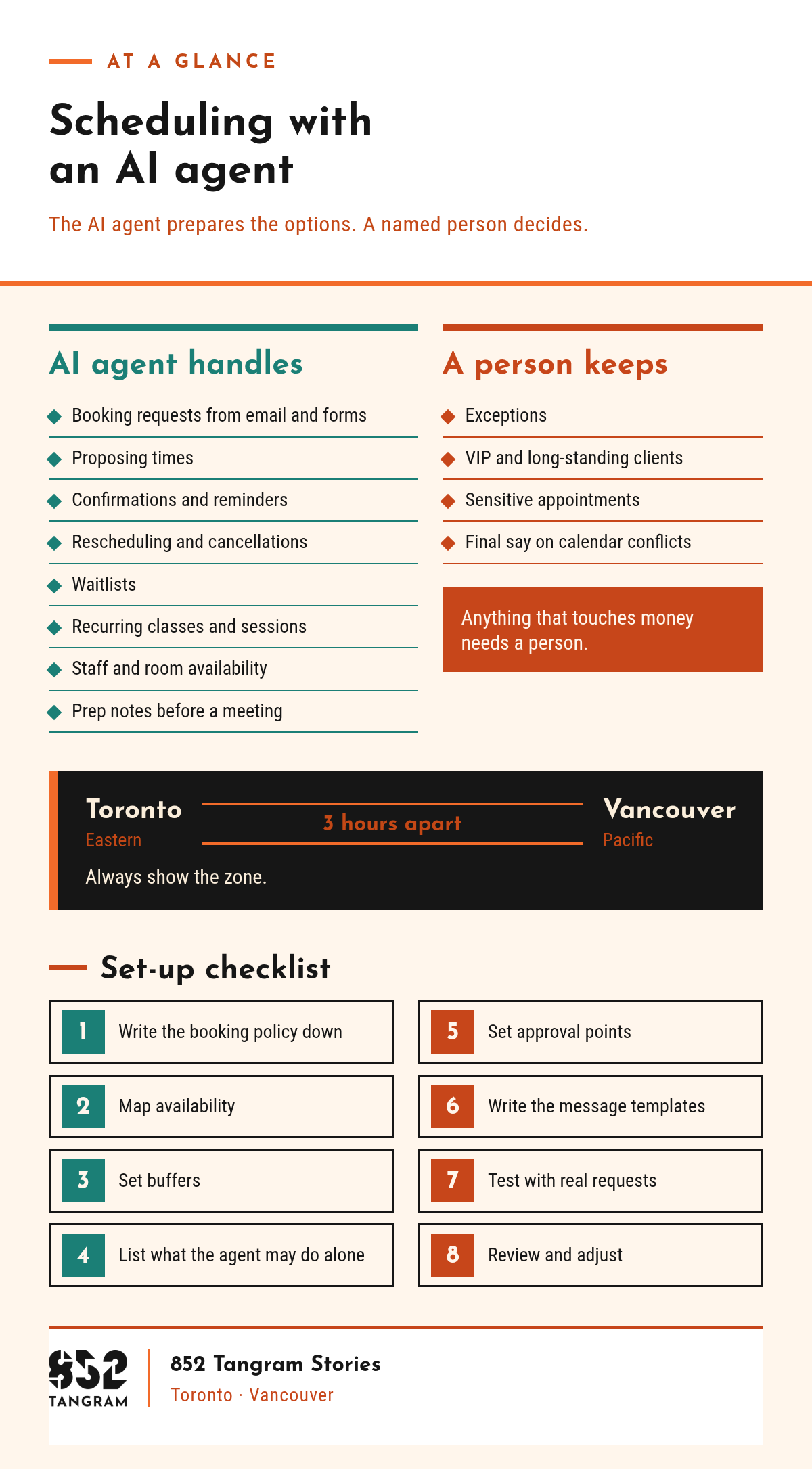
An AI agent can handle booking requests, confirmations, reminders, reschedules, waitlists, recurring classes and prep notes.
A named person keeps exceptions, VIP clients, sensitive appointments and the final say on calendar conflicts.
Toronto and Vancouver are 3 hours apart, so every proposed time should show its zone, Eastern or Pacific.
Write the booking policy down and test with real requests before going live.
What scheduling work can an AI agent handle for a small business?
An AI agent can handle the repeatable steps: reading the request, checking availability against your rules, proposing times and sending reminders. It works from your written booking policy, not from guesses.
In plain words, an AI agent (some call it an AI assistant) is software that reads requests, follows your written rules and takes set actions, with a person checking the parts that matter. Scheduling jobs it can take on:
Booking requests from email and forms: picks out the service, preferred times and who is asking, and drafts the reply.
Proposing times: offers open slots that respect buffers, staff hours and rooms.
Confirmations and reminders: sent with the time zone shown.
Rescheduling and cancellations: applies your written policy and frees the old slot.
Waitlists: offers a freed spot to the next person in order.
Recurring classes and sessions: sets up the series and flags holidays or instructor changes.
Staff and room availability: matches each booking to the right person and room, and spots double bookings.
Prep notes before a meeting: pulls the intake form, past notes and open items into a short brief.
What should a person still decide in scheduling?
A named person keeps every call that needs judgement: exceptions, VIP clients, sensitive appointments and the final say on calendar conflicts. The AI agent prepares the options. A named person decides.
Exceptions: booking outside the policy, skipping a late-change fee, coming in after hours. Anything that touches money needs a person.
VIP and long-standing clients: keep a list the agent must flag rather than answer.
Sensitive appointments: health, legal and personal matters. Clinics, wellness practices and law firms should check with their regulator or professional body on how booking information may be handled.
Calendar conflicts: the agent flags the clash and suggests options; a person makes the final call.
A named person also approves anything going to a client that involves money, clinical or legal judgement, or confidential files.
Not sure which scheduling steps your team could hand over?
Book a free strategy call, or send us a short note and we'll reply by email (the short form is at the end of this post).
How does AI agent scheduling differ for clinics, classes and client meetings?
The steps look alike, but the risks differ: clinics carry sensitive information, classes are about capacity and recurring sessions, and client meetings are about preparation and time zones.
| Scheduling task | AI agent | Person |
|---|---|---|
| Clinic: new appointment request | Offers open times with the right practitioner, confirms | Reviews anything urgent or sensitive |
| Clinic: reminders and no-shows | Sends reminders, logs no-shows | Decides on fees and follow-up |
| Class: recurring weekly session | Sets up the series, room and instructor, flags holidays | Approves the term schedule and instructor changes |
| Class: full class and waitlist | Offers freed spots in order | Handles requests to skip the waitlist |
| Client meeting: booking from an email | Proposes times with the zone, sends the invitation | Approves new and VIP client meetings |
| Client meeting: preparation | Drafts a prep note from past notes | Checks it and decides what to share |
| Any: calendar conflict | Flags the clash and suggests options | Makes the final call |
| Any: cancellation or reschedule | Applies the policy, offers new times | Approves refunds and fee waivers |
How do you schedule across Toronto and Vancouver time zones?
Toronto runs on Eastern time and Vancouver on Pacific time, 3 hours apart, so every time an AI agent proposes should show its zone.
Always show the zone. For cross-city meetings, show both: a call at noon Eastern is nine in the morning Pacific.
Set hours in each person's own zone. Enter a Vancouver bookkeeper's day and a Toronto partner's day in local time.
Agree on a shared window. An early Toronto start is very early in Vancouver, and a late Vancouver afternoon is evening in Toronto.
Send messages in the recipient's time. Confirmations, reminders and online class listings show the client's local time and zone.
How do you set up an AI agent for scheduling?
Write the rules down, connect the AI agent, then test it with real requests before it touches a live calendar. Set-up checklist:
Write the booking policy down. Who can book what, how far ahead, cancellation rules, waitlist order and what counts as an exception.
Map availability. Each person's hours in their own time zone, each room, every recurring class or session.
Set buffers. Time between appointments for notes, changeovers or travel, plus a same-day cut-off.
List what the agent may do alone. For example: propose times, send reminders, keep the waitlist.
Set approval points. Name who approves exceptions, VIP bookings, sensitive appointments, fee waivers and conflicts.
Write the message templates. Confirmation, reminder, reschedule and cancellation wording, each showing the time zone.
Test with real requests. Run recent booking emails and form entries through a test calendar, with a person checking every answer.
Review and adjust. Check flagged items and mistakes each week at first, and update the rules.
Setup and process matter more than the software, as covered in why marketing automation fails. See also AI marketing automation for small business on starting with one workflow, and what AI marketing automation can and can't do yet.
How we start: watch the schedule before automating it
Scheduling rules are easier to write once you have seen how bookings arrive. 852 Tangram spent time in a client's office, shadowing their team to follow their daily work, then set up an AI agent to automate their daily paperwork, class scheduling and admin. That client is a dance studio we work with. The method behind that first step is in Shadow First, Automate Second.
Frequently asked questions
Can an AI agent book appointments for a small business? Yes, an AI agent can book appointments for a small business when it works from written rules. It reads requests from email and web forms, proposes open times, books the slot and sends a confirmation and reminders. A named person should still review exceptions, VIP clients, sensitive appointments and any calendar conflict before a booking is final.
Can an AI agent manage recurring classes and waitlists? An AI agent can manage recurring classes and waitlists by setting up the weekly series, booking the room and instructor, and offering freed spots to the next person on the waitlist in order. A person should approve the term schedule, any instructor change and every exception, such as a request to skip the waitlist.
Which scheduling decisions should stay with a person? Scheduling decisions that need judgement should stay with a named person: exceptions to the booking policy, VIP and long-standing clients, sensitive health, legal or personal appointments, refunds or fee waivers, and the final say on calendar conflicts. The AI agent can prepare the options and draft the reply, but the person approves it.
How should an AI agent handle Toronto and Vancouver time zones? An AI agent scheduling across Toronto and Vancouver should show every time with its zone, Eastern or Pacific, because the two cities are 3 hours apart. Set each person's hours in their own zone, agree on a shared window for cross-city meetings, and send confirmations and reminders in the recipient's local time.
Should clinics and law firms use an AI agent for bookings? Clinics and law firms can use an AI agent for routine booking steps, such as offering times and sending reminders, but sensitive appointments need a person. Health and legal information carry privacy and professional duties, so check with your regulator or professional body on how booking information may be handled before you set anything up.
How do you test an AI agent before it runs your calendar? Test an AI agent before it runs your calendar by running recent real booking requests through a test calendar, with a person checking every proposed time, message and flag. Fix the written rules wherever it gets something wrong, start with low-risk bookings, and keep exceptions with a named person.
Talk to 852 Tangram
Want scheduling that follows your rules, with a person holding the final say? We can start with how bookings reach your team today. See our AI operations setup for professional services.
Book a free strategy call, or send us a short note and we'll reply by email.
About 852 Tangram: 852 Tangram is a bilingual creative agency serving Toronto/GTA and Vancouver.